The client trail is the work.
- The firm wants a ready client-operations role.
- A supported Zoom participant and reviewed follow-up are required.
- The owner does not want to build and maintain connectors before value.
Claude Team is a workspace for reasoning, writing, projects, and shared knowledge. Workforce AI turns that kind of intelligence into a specific operating role that keeps client work moving through connected tools.
Small teams that want a named AI employee running recurring client operations across meetings, inboxes, tasks, and channels.
Teams that want reasoning and writing, long-context projects, shared knowledge, collaboration, and configurable connectors.
Claude Team creates answers and artifacts inside a team workspace. Workforce AI carries the work into inboxes, meetings, client channels, follow-up, tasks, and approvals. Your business probably has enough excellent documents already. The question is who handles what happens next.
A check means supported. A dash means partial or conditional. A question mark means the vendor did not publish enough to decide.
AI employees are configured around recurring work for small professional-services and local-business teams.
Claude Team can support a small firm, but it starts as a general reasoning workspace rather than a packaged operating role.
Connects Gmail or Outlook and prepares drafts from the actual thread and account context.
Connectors can provide authorized work context; a ready connected-inbox drafting workflow depends on the connector.
Client-facing email remains a draft for owner review and sending.
Tool calls can be permissioned, but a client-email review queue is not the standard Team experience.
Can join supported Zoom meetings with the owner or from a supplied brief.
Claude Team does not include a visible, interactive Zoom employee.
Turns supported meeting context into a write-up, draft, and explicit next steps inside the same work trail.
Claude can prepare follow-up and use connectors, while the durable cross-system workflow must be configured.
Supports recurring tasks, scheduling context, reminders, and connected next steps.
Connector tools can create or update work, but task execution depends on the selected integration.
Keeps account-scoped context across connected email, meetings, chat, SMS, WhatsApp, tasks, and uploaded knowledge.
Projects and knowledge bases provide durable shared context inside the team workspace.
The account owner can work with the AI employee through supported SMS and WhatsApp channels.
Owner SMS and WhatsApp are not standard Claude Team work surfaces.
Workforce AI configures roles and workflows, but it is not sold as a general-purpose agent development platform.
MCP connectors, skills, projects, and APIs support broad custom agent and workflow construction.
The current product is owner-side. Browser voice is available, but autonomous customer phone answering and customer-facing website support are outside the current product boundary.
A customer-facing assistant can be built with Anthropic APIs, but it is not the packaged Team product.
Industry configurations support common workflows, while licensed professional judgment and specialist systems stay with the firm.
Claude Team is a horizontal workspace rather than a profession-specific operating system.
The email drafter is free and full AI employee plans start at $99 per user per month.
Team pricing and its five-member minimum are published.
These are real Workforce AI product views. The point is continuity: useful context enters once, then carries into the draft, follow-up, or next task.
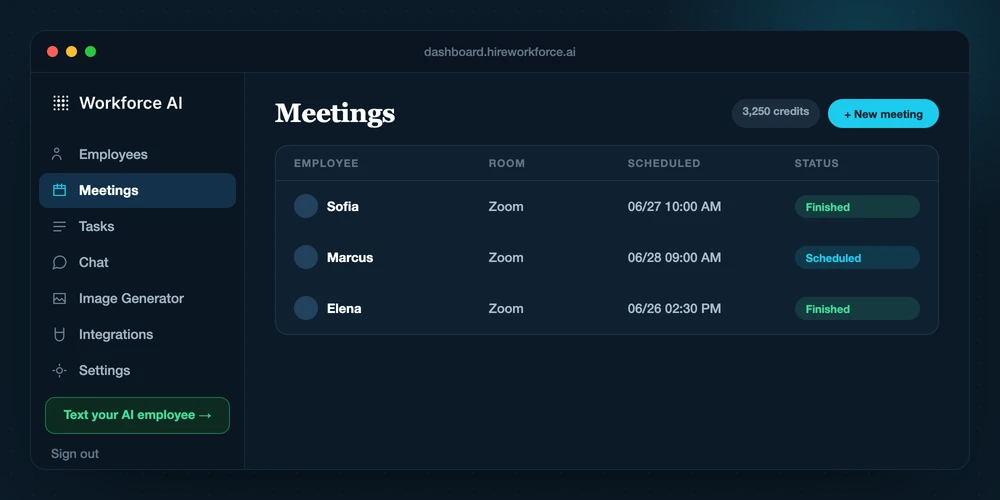
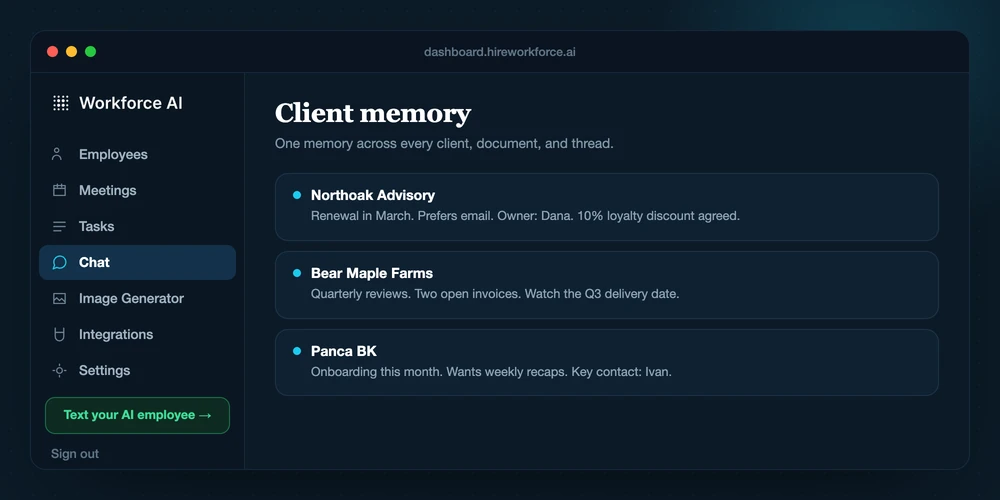
Claude Team can produce strong reasoning and artifacts. Workforce AI is designed to keep the surrounding client work attached to the answer.
Connect the owner's supported email, calendar context, and other selected tools.
Create the Team workspace, project, and authorized knowledge context.
Give the AI employee a recurring job, a real thread, or a supported Zoom meeting.
Add the required connector or MCP tools for the job.
Review the prepared email, meeting write-up, task, or sensitive next step.
Ask Claude to reason, draft, analyze, or invoke a supported tool.
Carry the approved context into the next client touch instead of rebuilding it from scratch.
Review the result and maintain the cross-system workflow around it.
Do not score a demo on the first answer. Score the complete job, the manual handoffs, the review point, and what survives into the next interaction.
Which exact job does Claude Team complete without a manual handoff?
Which actions require approval, and where is the approval history visible?
How much setup and ongoing maintenance does a reliable workflow require?
What is the full price after usage, integrations, implementation, and support?
Reviewed August 26, 2026.
Not for every job. Claude and Workforce AI overlap in some areas, but the better choice depends on whether you need a general assistant, a focused email tool, or an AI employee configured around recurring business workflows.
Yes. Many teams keep a general AI or specialist tool for the work it does well and use Workforce AI for connected client operations, approvals, follow-up, meetings, and recurring tasks.
The product and pricing facts were reviewed on August 26, 2026. Vendor features and prices can change, so confirm time-sensitive plan details before purchasing.
A feature table is useful. A real inbox, meeting, or follow-up process makes the difference obvious.
