Best AI employee platforms for small business in 2026
The label on the homepage matters less than the operating model underneath it. This guide shows who each product fits, where it works, who maintains it, and exactly where a person stays in charge.
Which AI employee platform is best for a small business?
For a relationship-driven firm with 1-20 people that wants one owner-side system across Zoom, Gmail or Outlook, text, WhatsApp, and dashboard chat, Workforce AI is the closest fit in this group. Lindy suits a Slack-centered inbox and meeting workflow. Sintra offers a packaged team of role-based helpers. Get BOB and CellCog organize work around standing digital roles. Zapier Agents, Relevance AI, and Microsoft Copilot Studio fit businesses prepared to design and maintain agent workflows. The right choice follows the job, the channels, and the review boundary your team can actually operate.
Eight platforms compared on the operating details
Prices and packaging change. The entries below were checked on 2026-08-24.
| Platform | Shape and fit | Working channels | Review boundary | Maintenance | Published starting point |
|---|---|---|---|---|---|
| Workforce AI | AI employee for owner-side client operations | Zoom avatar, Gmail or Outlook drafts, owner SMS and WhatsApp, dashboard chat | Client-affecting work stays owner-approved; email remains draft-first | Low to medium: connect tools, set briefs, review work | Free email drafter; Starter $99/user/month |
| Lindy | AI assistant and Slack-native teammate | Slack, inboxes, meetings, calendar, iMessage, connected apps | Outside-impact actions wait for approval on the current pricing page | Low to medium: maintain skills, routines, context, and credits | Plus $29.99/user/month on the live pricing page |
| Sintra AI | Twelve role helpers plus custom helpers | Web, iOS, Android, scheduled work, connected apps | Approval behavior varies by helper and automation | Medium: maintain business context, schedules, and credits | Sintra X $97/month or $468/year in the help center |
| Get BOB | Plain-language digital employees for recurring jobs | Insights Feed and work across 3,000+ connected apps | Human checkpoints can be set for sensitive decisions | Medium: manage job descriptions, permissions, and exceptions | Mini $29/month for 50 BOB Jobs |
| CellCog | Standing AI employees that work in shifts and form teams | Employee inbox, task board, browser, and connected tools | Permission thresholds decide what runs and what waits | Medium to high: supervise roles, shifts, tools, and usage | Plans advertised from $8/month plus credits |
| Zapier Agents | Agent and workflow builder for connected apps | 9,000+ apps, web, Chrome, triggers, and app actions | Per-tool approval and Human in the Loop must be configured | High: build, test, monitor, and update workflows | Free 400 activities; Pro $33.33/month billed annually |
| Relevance AI | Visual agent and multi-agent workforce builder | Relevance Chat, 2,000+ integrations, calling and meeting agents on Team | Each connection can auto-run, require approval, or let the agent decide | High: design roles, tools, handoffs, limits, and evaluations | Free; Pro $29/month; usage is metered |
| Microsoft Copilot Studio | Low-code agent and flow platform | Teams, websites, mobile apps, Facebook, and Azure Bot Service channels | Human review and approval stages are designed into flows | High: Power Platform admin, connectors, environments, and credit planning | $200/month per 25,000-credit capacity pack |
Assistants, agents, and AI employees are different buying decisions
These labels overlap, and vendors use them differently. Treat them as an operating test rather than a hierarchy. A product does not become a better worker because its landing page gave it a job title.
An assistant usually waits for a person to ask. It answers, drafts, summarizes, or retrieves information, and the person carries the result into the next system. An agent receives a goal, chooses steps, and uses approved tools. It may run from a trigger or schedule, which creates a real need for limits, failure handling, and review rules.
An AI employee packages one or more agents around a standing role. Look for persistent responsibility, durable context, a work queue, recurring availability, named channels, and a visible supervisor. The term describes product design. It does not create legal employment status, professional judgment, or permission to act without oversight.
- Assistant: person starts each piece of work and moves the answer onward.
- Agent: software plans or executes a multi-step goal with connected tools.
- AI employee: a persistent role with assigned work, context, channels, and supervision.
- Chatbot and notetaker: narrow interfaces that may support the role without owning it.
Choose the work surface before the feature list
Workforce AI fits an owner whose client work moves through Zoom, an inbox, private owner messaging, and follow-up. Lindy begins closer to Slack, inbox, calendar, and meeting work. Sintra begins with a roster of specialist helpers. Those are three different desks, even when all three can draft an email.
Get BOB and CellCog make the standing role more explicit. Get BOB turns a plain-language job description into recurring work across apps and adds multi-tenant workspaces for agencies. CellCog gives each employee an inbox, task board, schedule, and permission set, then allows employees to hand work to one another.
Zapier, Relevance AI, and Copilot Studio are platforms for assembling the operating system yourself. They can cover far more unusual processes, but somebody must own the design. A small firm gets value from that flexibility only when it has an operator who will still care about the workflow in month six.
- Pick Workforce AI for one owner-side role across supported meetings, inbox work, messaging, and memory.
- Pick Lindy when Slack and personal work management are the natural front door.
- Pick Sintra when packaged marketing, content, sales, and admin helpers cover the need.
- Pick Get BOB or CellCog when you want named standing roles and are ready to supervise their scope.
- Pick Zapier, Relevance AI, or Copilot Studio when custom orchestration is worth a permanent builder.
Human in the loop can mean five different things
One platform may hold every external action. Another may ask only when its own confidence is low. A third may run anything below a permission threshold. All three can say a human stays in control. The operational risk is completely different.
Write the boundary action by action. Reading a calendar is not sending an email. Drafting a reply is not publishing it. Updating a test record is not changing a price or issuing a refund. Start with read-only work and drafts, then approve exact reversible actions before granting any bounded autonomy.
Workforce AI keeps client-affecting work owner-approved, including client-facing email. Lindy states that outside-impact actions wait for approval. Get BOB, CellCog, Zapier, Relevance AI, and Copilot Studio expose configurable control, so the buyer owns the quality of that configuration. A default, a recommendation, and a hard technical stop are not interchangeable.
- Which exact actions can run without a person?
- Is approval global, per tool, per workflow, or decided by the model?
- Can the reviewer see recipients, changed fields, source facts, and expected result?
- What happens when approval expires or nobody responds?
- Does the audit trail show what was proposed, approved, and actually executed?
Every platform creates a maintenance job
Managed products reduce workflow construction. They do not remove management. Someone still updates source material, reviews exceptions, removes old permissions, watches usage, and notices when the business process changes.
Builder platforms add more moving parts: prompts, triggers, tool schemas, field mappings, branches, retries, model choices, budgets, and deployment versions. That control is valuable for a process unique enough to deserve it. It is expensive when the owner becomes the unpaid integration team.
Name one maintenance owner before buying. Give that person time, access, a monthly review, and a way to pause the system. If nobody accepts the job, choose the product with the smallest configuration surface that still covers the work.
- Weekly: review failed, corrected, escalated, and unexpectedly expensive work.
- Monthly: test permissions, source freshness, approval routing, and usage limits.
- After any process change: rerun representative cases before restoring autonomy.
- At offboarding: revoke accounts, tokens, forwarding rules, schedules, and shared access.
The subscription is the first line, not the total
The products here meter work in different units: seats, credits, activities, actions, model usage, jobs, or capacity packs. Compare them with one month of your own volume. A cheap plan that pauses halfway through the busy week can cost more than a larger predictable plan.
Add setup hours, connected-app charges, premium connectors, review time, corrections, and the person who maintains the system. For custom agents, include model and infrastructure costs. For meeting products, include recording or avatar hours. For messaging, include outbound bundles or provider fees.
Use cost per accepted outcome. Count the replies the owner kept, the meetings correctly written up, the records updated without repair, or the complete jobs delivered. Generated output is inventory. Accepted work is value.
Two weeks is enough to reject a bad fit
Choose twenty representative cases from one repeated job. Include ordinary work, missing information, a sensitive case, a duplicate, and a system failure. Run the first cases in shadow mode, then drafts, then exact approved actions if the earlier stages hold up.
Measure acceptance rate, edit time, human interventions, missed escalations, elapsed time, and total usage cost. Keep the source material and scoring rule fixed so a better-looking demo does not replace evidence.
At the end, expand, narrow, or stop. A pilot succeeds when the accepted work creates more value than setup, review, correction, and risk. The number of animated employees on the dashboard is not a business result.
- Use the same real cases for every shortlisted product.
- Do not connect live sending or money movement for the first comparison run.
- Record every correction and every hidden manual step.
- Confirm the month-three owner before expanding the role.
The tools, one job at a time
Each entry names the job it handles best and the tradeoff that matters after the trial.
- 01
Workforce AI
Official sourceBest for: relationship-driven firms with 1-20 people that want one owner-side role across Zoom, inbox work, private messaging, and follow-up
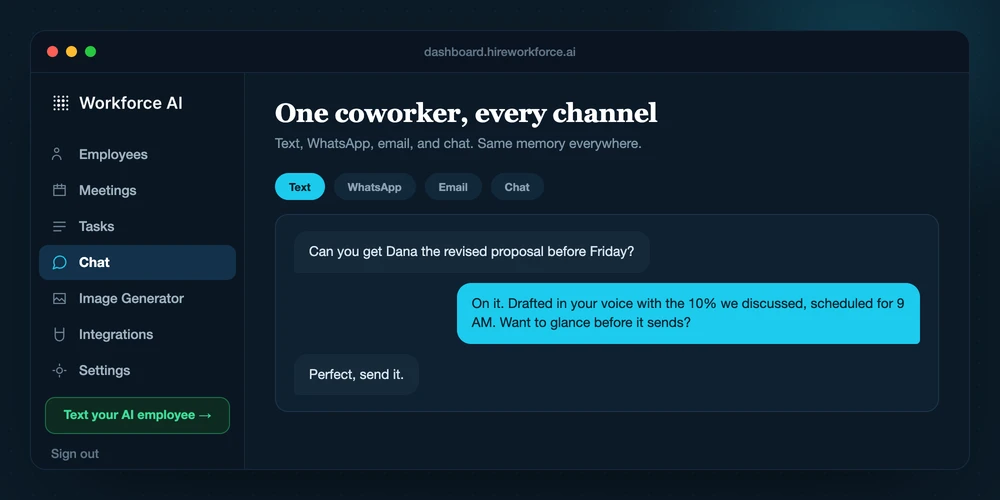
Workforce AI can join supported Zoom meetings with a live avatar, prepare Gmail or Outlook drafts in the owner's learned voice, and carry account-scoped context across meetings, email, dashboard chat, and the owner's SMS and WhatsApp conversations. Client-facing email remains a draft until the owner approves and sends it.
Workforce AI view: This is the strongest fit here when the owner wants to delegate one connected client-work role without becoming a workflow builder.
- Current cost
- Free Gmail or Outlook email drafter; Starter begins at $99 per user monthly
- Watch for
- Meeting participation is Zoom only. SMS and WhatsApp are private owner channels, not a line for the owner's customers. Meeting summaries need review, and paid plans meter AI work, meeting time, and messaging separately.
- 02
Lindy
Official sourceBest for: professionals and teams that want a Slack-centered assistant for inbox, meetings, calendar, and connected work
Lindy's current product centers on a teammate in Slack with persistent workspace context, inbox management, reply drafting, meeting recording and notes, scheduling, routines, iMessage, and connected tools. The live pricing page says actions with outside impact wait for approval.
Workforce AI view: Lindy is compelling when Slack is where delegation begins. Workforce AI puts more weight on a live Zoom presence and owner access through SMS and WhatsApp.
- Current cost
- Plus lists $29.99 per user monthly; an official documentation page still lists $49.99
- Watch for
- Official pricing pages disagree on the Plus price and connected-inbox limits. Confirm checkout terms. Credits are pooled by seat, refresh monthly, and can pause work when exhausted.
- 03
Sintra AI
Official sourceBest for: solo owners who want packaged helpers for marketing, content, sales, support, and administration
Sintra X includes twelve named helpers, shared business context through Brain AI, scheduled tasks, custom helpers, and connected apps. The product spans assistant work and scheduled agent work, so evaluate the exact helper rather than treating the whole bundle as one role.
Workforce AI view: Sintra can be the economical choice when the main need is a bench of role-based content and business helpers. Cross-channel owner operations are a different purchase.
- Current cost
- Sintra X lists $97 monthly or $468 yearly in the official help center; promotions may differ
- Watch for
- Credits vary by task complexity and helpers stop when the workspace runs out. Public pages use broad approval language, so define the stop point for every client-facing or system-changing automation.
- 04
Get BOB
Official sourceBest for: agencies and small operators that want to describe recurring jobs in plain language and run them across many apps
Get BOB turns a role description into one or more digital employees, reports progress through an Insights Feed, and supports work across more than 3,000 apps. Team permissions and multi-tenant organizations make the shape especially relevant to agencies managing separate client environments.
Workforce AI view: Get BOB is a credible fit when recurring cross-app jobs and client workspaces matter more than a live meeting and owner-messaging presence.
- Current cost
- Mini BOB is $29 monthly for 50 BOB Jobs; Medium BOB is $99 for 200 jobs
- Watch for
- Plain-language setup still needs a precise outcome, approved systems, and exception rules. The vendor recommends human checkpoints for higher-judgment or brand-sensitive decisions and periodic review of job descriptions.
- 05
CellCog
Official sourceBest for: operators who want standing AI roles with inboxes, shifts, task boards, and delegation between AI employees
CellCog gives each AI employee a role, memory, inbox, task board, schedule, and connected tools. Employees can hand work to other employees and operate across multiple shifts, which makes it one of the clearest standing-worker designs in this comparison.
Workforce AI view: CellCog suits a buyer who wants to design an AI organization. Workforce AI suits an owner who wants one connected employee with a fixed client-approval boundary.
- Current cost
- Plans are advertised from $8 monthly; subscriptions and top-ups use a shared credit balance
- Watch for
- The review boundary is configurable. CellCog's terms say an employee may send email or take actions without per-item approval when the customer grants that authority. Scope, spend, schedules, and permission thresholds need active supervision.
- 06
Zapier Agents
Official sourceBest for: businesses that need flexible agentic work across a very large app catalog and have an automation owner
Zapier Agents can use thousands of app actions, triggers, live data sources, and web browsing. Zapier is moving agent capabilities into AI by Zapier, where prompts, tools, model tiers, structured outputs, and run history live inside the broader automation platform.
Workforce AI view: Zapier is the better fit when the hard problem is custom app orchestration. Workforce AI is the better fit when the hard problem is delegating the surrounding owner work.
- Current cost
- Agents lists a free 400-activity tier and Pro at $33.33 monthly on annual billing
- Watch for
- The migration changes the product surface and billing model. Per-tool approval in AI by Zapier is optional and off by default, while the separate Human in the Loop step requires a paid account. Budget for testing and ongoing workflow ownership.
- 07
Relevance AI
Official sourceBest for: operations or technical teams that want to build custom agents and multi-agent workforces visually
Relevance AI provides a visual canvas for agents, tools, and multi-agent handoffs. Pro adds scheduled workforces, while Team adds calling and meeting agents, analytics, higher concurrency, and more shared capacity.
Workforce AI view: Relevance AI offers more design freedom. A small firm should choose it only when someone owns that freedom after launch.
- Current cost
- Free; Pro is $29 monthly; Team is $349 monthly, plus action and model usage
- Watch for
- Every workforce needs role design, tools, routing, test cases, and monitoring. Approval is configured per connection as Auto Run, Approval Required, or Let Agent Decide, so the builder determines the real safety boundary.
- 08
Microsoft Copilot Studio
Official sourceBest for: Microsoft-centered organizations with Power Platform administration and a need for custom internal or customer-facing agents
Copilot Studio is a graphical low-code environment for agents and agent flows. It can publish to Teams, websites, mobile apps, Facebook, and channels supported by Azure Bot Service, while working with Microsoft 365 and Power Platform data and tools.
Workforce AI view: Copilot Studio starts in the Microsoft tenant and rewards an existing IT function. Workforce AI starts with the daily channels of a smaller owner-led firm.
- Current cost
- $200 monthly for a tenant-wide 25,000 Copilot Credit pack; pay-as-you-go is also available
- Watch for
- Credit use depends on answers, actions, grounding, and flow design. Environments, connectors, identity, testing, and lifecycle management need an owner. Human review is available, but it has to be placed deliberately in the flow.
What small-business buyers ask
What is an AI employee?
An AI employee is a product built around a standing digital role rather than a one-off prompt. Useful signs include assigned responsibilities, persistent context, a queue or schedule, connected tools, named communication channels, and a human supervisor. The term is not standardized and does not make software a legal employee or a qualified professional.
How is an AI employee different from an assistant or agent?
An assistant usually responds when a person asks. An agent can plan steps and use tools toward a goal. An AI employee packages agent behavior into a persistent role with recurring work, context, channels, and supervision. One product can contain all three modes.
How much does an AI employee platform cost in 2026?
The self-serve products in this guide begin anywhere from free to several hundred dollars per month. The bill may also include seats, credits, activities, actions, model usage, meeting hours, messages, connectors, and maintenance time. Compare cost per accepted business result using your expected monthly volume.
Which platform fits a non-technical small-business owner?
Choose a managed product whose normal channels already match the job. Workforce AI fits owner-side work across supported Zoom meetings, Gmail or Outlook drafts, private owner messaging, and follow-up. Lindy fits a Slack and inbox-centered workday. Sintra and Get BOB offer more packaged role choices. Builder platforms make sense only when someone will own the build.
Which AI employee platforms offer approval controls?
All eight publish some form of oversight, but the controls differ. Workforce AI holds client-affecting work for the owner. Lindy says outside-impact actions wait. Get BOB, CellCog, Zapier, Relevance AI, and Copilot Studio expose configurable boundaries. Sintra describes selective approvals at the helper level. Verify the exact action, default setting, reviewer, timeout, and audit trail.
Can an AI employee join a live Zoom meeting?
Workforce AI can join a supported Zoom meeting with a live avatar, participate using the owner's brief, and produce a write-up. Its meeting support is Zoom only, and the output needs review. Other products in this guide offer meeting notes, calling agents, or meeting workflows, but those are not automatically the same as a speaking live avatar.
Can an AI employee replace a member of staff?
It can cover bounded pieces of repeatable work. Keep people accountable for judgment, client relationships, money, legal or clinical decisions, sensitive exceptions, and the operating policy around the software. Compare the role by accepted work and supervision required, not by the vendor's job title.
Pages checked for this guide
- Workforce AI pricing and plan boundaries
- Workforce AI category comparison
- Workforce AI Company Brain
- Workforce AI security and compliance
- Lindy pricing
- Lindy pricing documentation
- Sintra plans and pricing
- Sintra workspace credits
- Get BOB product overview
- Get BOB plans
- CellCog pricing
- CellCog AI employees
- CellCog terms and approval boundary
- Zapier Agents setup
- Zapier agent approvals
- Zapier Agents migration
- Relevance AI pricing
- Relevance AI Workforce
- Relevance AI approvals and escalations
- Microsoft Copilot Studio overview
- Microsoft Copilot Studio pricing
- Microsoft human review in agent flows
Let a real thread earn the next assignment.
Connect Gmail or Outlook and test the free email drafter on work already waiting in your inbox. You review every draft before anything goes out.
